Automations
Summary
Every team has processes that happen the same way every time.
A code case is assigned to the appropriate inspector. A permit reaching a new stage triggers an email. A failed inspection creates a follow-up task. A flood warning requires staff to notify the right people and flag affected properties.
These are important steps, but they're often manual - relying on staff to remember what happens next.
Forerunner's Automations Builder helps agencies automate these routine workflows, ensuring work is routed correctly, notifications are sent, and follow-up actions happen automatically whenever records change.
Build Automations
Account administrators can create Automations through a visual builder - no engineering support or custom development required.
Automations can be triggered when:
- A record is created
- Any record is updated
- A specific field changes or reaches a particular value
From there, teams can automate the next step in their workflow.
Keep Work Moving Automatically
Automations can perform a variety of actions, including:
- Create tasks with configurable assignees, due dates, and descriptions.
- Send email notifications to internal users using dynamic record data, so every message includes the right context.
- Add or remove property warnings automatically, eliminating manual updates during changing conditions.
Using built-in variables, the same automation can adapt to every record by pulling information such as addresses, submitter details, parcel information, or other record-specific data.
Manage Complex Workflows with Conditional Logic
Not every workflow follows the same path.
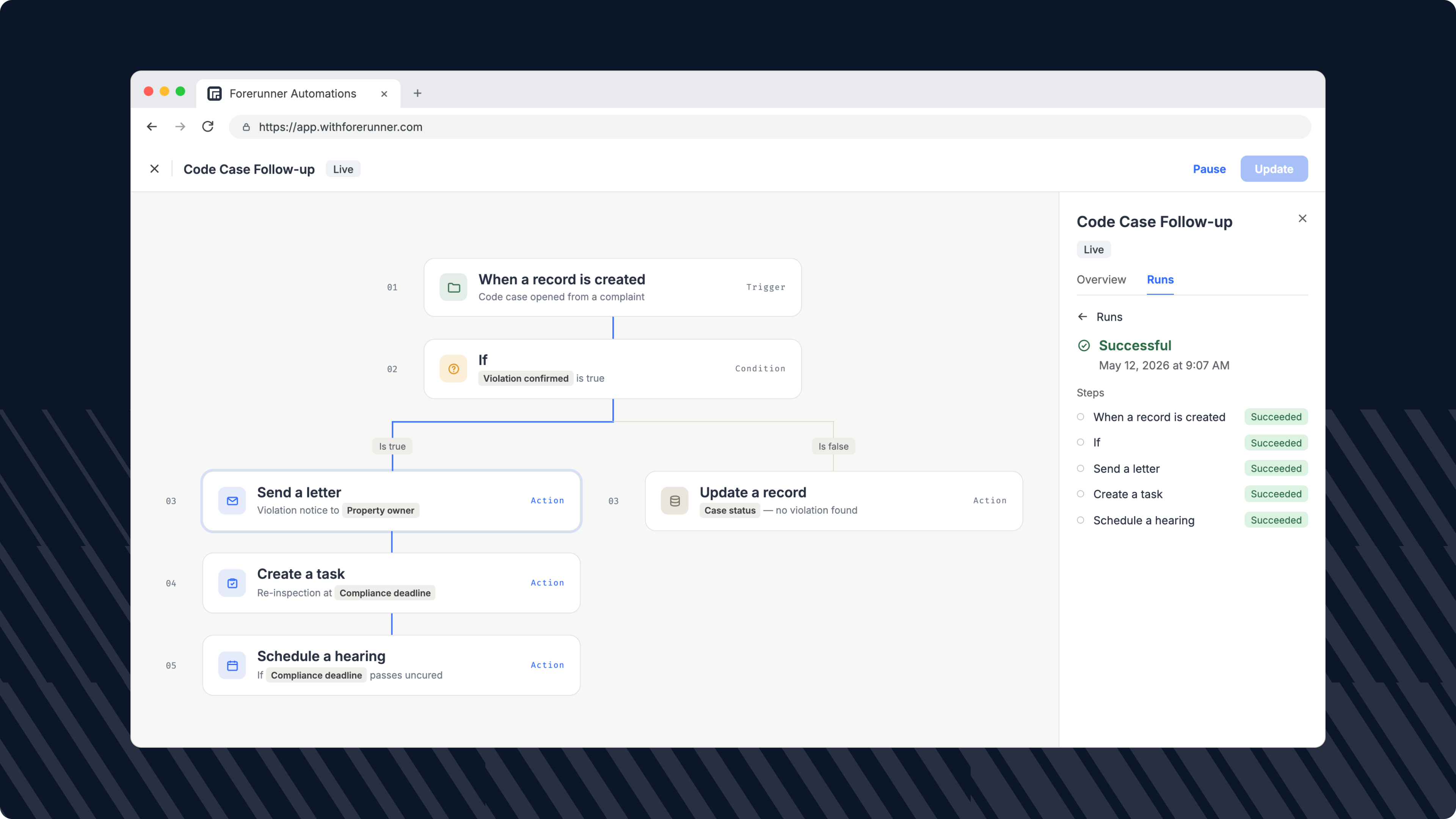
Forerunner's Automations Builder includes multi-path conditions conditions that allow agencies to build workflows based on record data. Different case types can be assigned to different inspectors, grant programs can send different notifications, and high-priority cases can automatically receive tighter deadlines.
Conditions can also be nested, making it easy to support more sophisticated processes as agency needs grow.
Route Work to Staff
Automated case routing ensures work reaches the appropriate staff member without manual assignment.
Tasks can be routed based on factors such as:
- Case type
- The user who created the record
- Geographic zones or assigned service areas
This helps eliminate bottlenecks while ensuring new work is immediately directed to the appropriate team.
Monitor Every Automation
Admins can manage all automations from a centralized dashboard that displays each automation's status, trigger type, and configuration.
Every automation also includes a detailed run history, allowing teams to verify successful executions or quickly identify and troubleshoot issues if something does not run as expected.
Flexible for Every Department
Automations are built around record events rather than a single workflow, so they can support operations across many departments.
Common examples include:
- Automatically assigning new code enforcement cases to the appropriate officer.
- Creating follow-up inspections after failed stormwater inspections.
- Notifying homeowners when grant applications are approved.
- Creating review tasks when Elevation Certificates are submitted.
- Automatically adding and clearing flood warnings as conditions change.
No matter the workflow, the goal is the same: reduce manual effort, eliminate missed steps, and help staff work more efficiently.
Automations help agencies deliver faster service, improve consistency, and ensure critical work progresses.
FAQ
Ready to see how Forerunner can support your community?
Book a demo